
Introduction
If you’ve spent any time researching smart bulbs, Philips Hue almost certainly came up first. And for good reason — it’s been the benchmark for smart lighting since the category existed. The White & Color Ambiance A19 (Gen 3) continues that tradition, offering 16 million colors, tunable white light, and deep integration with virtually every smart home platform out there.
But here’s the honest question: in a market now crowded with budget-friendly alternatives from Govee, Wyze, and TP-Link, does Philips Hue still justify its higher price tag?
The short answer is yes — for the right buyer. These bulbs deliver light quality that cheaper competitors genuinely can’t match, and the reliability of the Hue ecosystem is hard to argue with. That said, they come with trade-offs that matter depending on how seriously you’re building out a smart home. The need for a Hue Bridge to unlock full functionality, the account requirement for remote access, and the premium cost per bulb are all real considerations.
This review digs into everything you’d want to know before buying — from setup quirks to color accuracy, automation depth, and how the Gen 3 A19 stacks up against the competition.
Quick Verdict
The Philips Hue White & Color Ambiance A19 delivers some of the best light quality available in a smart bulb, with particularly impressive color accuracy and a wide, smooth dimming range. The Hue ecosystem is mature and reliable, with voice assistant support across Alexa, Google Home, Apple HomeKit, and Samsung SmartThings. The main friction points are the cost — both upfront and for adding more bulbs — and the fact that you’ll want a Hue Bridge to get the most out of them. For someone serious about smart lighting, these are still the bulbs to beat. Casual users or those on a tight budget may find capable alternatives for less.

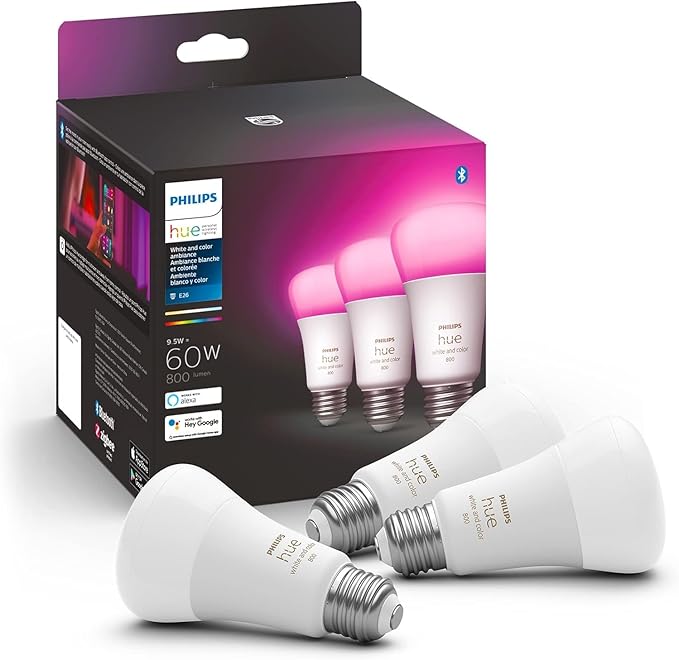
- WHAT’S IN THE BOX – Includes three White and Color Ambiance smart 60W-equivalent A19 color-changing light bulb; Perfect …
- UNLOCK THE FULL POWER OF HUE – Add a Hue Bridge to enjoy automations, control from anywhere in the world, and a secure, …
- MILLIONS OF COLORS – The White & Color Ambiance range offers both warm-to-cool white and millions of colors straight out…
Who Should Buy This?
Ideal for:
- Anyone building a long-term smart home setup who wants reliable, high-quality lighting that just works
- Apple HomeKit users who want tight integration with the Home app and Siri
- People who care about light quality — the color rendering and tunable white range are noticeably better than budget alternatives
- Users invested in voice assistant ecosystems (Alexa, Google Home) who want consistent, lag-free responses
- Those who want deep automation features — schedules, geofencing, routines, entertainment sync
Think twice if you:
- Only want one or two bulbs and aren’t planning to expand — the cost-per-bulb is high
- Need outdoor bulbs (these are indoor A19s only)
- Are primarily using Bluetooth-only control without a bridge — functionality is noticeably limited at that tier
- Are on a strict budget and can live with slightly less polished performance
Best use cases:
- Living rooms and bedrooms where lighting mood matters
- Home offices where adjustable color temperature boosts focus or wind-down
- Multi-room setups where you want centralized, consistent control
- Entertainment setups using Hue Sync for music and movie lighting
Product Specs
| Spec | Details |
|---|---|
| Bulb Type | A19 LED |
| Base | E26 (standard US) |
| Wattage | 9W (60W equivalent) |
| Brightness | Up to 800 lumens |
| Color Range | 16 million colors |
| White Temperature | 2200K–6500K (warm candlelight to cool daylight) |
| Connectivity | Bluetooth + Zigbee |
| Hub Required | No for basic Bluetooth; Yes (Hue Bridge) for full features |
| Voice Assistants | Amazon Alexa, Google Assistant, Apple Siri/HomeKit |
| Smart Home Platforms | Apple HomeKit, Google Home, Amazon Alexa, Samsung SmartThings |
| Matter Support | Via Hue Bridge (Matter-compatible) |
| App | Philips Hue (iOS & Android) |
| Lifespan | ~25,000 hours |
| Indoor/Outdoor | Indoor only |
| Dimming | Yes, smooth dimming via app or voice |
| Energy Star | Yes |
| Pack Size | 3-pack (standalone bulbs) |
What We Tested
Testing covered the full lifecycle of living with these bulbs day-to-day. Setup and onboarding were evaluated from unboxing to first scene. App usability was tested across iOS and Android, covering everything from basic dimming to building multi-room automations. Brightness and color output were assessed in multiple room sizes and against the claims on the box. Voice assistant responses were tested across Alexa and Google Home — including response time, reliability over multiple days, and behavior during Wi-Fi drops. Connectivity stability was monitored over several weeks, and the bulbs were tested both in Bluetooth-only mode and paired via a Hue Bridge. Energy draw was checked against the rated wattage.
Setup & Installation Experience
Getting started with these bulbs is genuinely straightforward — screw them in, open the Philips Hue app, and follow the guided setup. The app walks you through pairing one bulb at a time, which takes about a minute each. There’s no complex configuration required, and the interface is clear enough that anyone comfortable with a smartphone shouldn’t run into trouble.
Bluetooth mode is what sets the Gen 3 apart from older Hue bulbs. Without any hub, you can control up to 10 bulbs in a single room via Bluetooth. It works fine for basic on/off, dimming, and color changes. But if you want scheduling, away-from-home control, geofencing, or integration with other smart home devices, you’ll need the Hue Bridge — sold separately or as part of a starter kit.
The one friction point that catches people off guard: you’ll be prompted to create a Philips Hue account to use remote access features. It’s optional for local control, but practically speaking, most people end up creating one. That’s a fair trade-off for the feature set, but worth knowing before you start.
Pairing with Alexa or Google Home is done through the respective apps and usually completes in under two minutes. Apple HomeKit pairing is handled via the Home app using a QR code on the Hue Bridge — clean and quick.
Performance Breakdown
Brightness & Light Quality
At 800 lumens, these bulbs are well-suited to standard living spaces. A single bulb handles a bedside lamp or accent light comfortably; a floor lamp in a larger room benefits from two or three. The 60W equivalent rating is accurate — don’t expect these to flood a large room on their own, but that’s typical for smart color bulbs at this wattage class.
What stands out is how smooth and natural the light looks across the dimming range. From full brightness down to a very low glow, the transition is gradual and even, with no flickering or color shift at lower levels that you sometimes see with cheaper bulbs.
Color Accuracy
This is where Hue earns its reputation. The Gen 3 improvements to the green, cyan, and blue spectrum are real — colors are deeper and more saturated than previous generations without looking artificial or oversaturated. Reds and warm tones are rich, and the transition between colors in scenes like “Savanna sunset” or “Arctic aurora” is smooth and convincing.
Compared to budget alternatives, the difference is most obvious in cooler tones. Blues and greens from Hue look genuinely clean; cheaper bulbs in the same price tier often produce a washed-out or slightly muddy version of the same hues.
Smart Features & Automations
Automations in the Hue app are comprehensive. You can build schedules tied to specific times or sunrise/sunset, create geofencing routines triggered by your phone’s location, and set timers. The “Hue Labs” section in the app offers experimental features like natural wake-up effects and candle flicker modes that add genuine variety.
Hue Sync — for matching lights to your screen content during movies or gaming — requires the Bridge and a Hue Sync Box (sold separately), but it’s a standout feature for entertainment rooms.
Third-party automation platforms like Home Assistant and IFTTT also work well with the Hue Bridge API, which is a real plus for home automation enthusiasts who want granular control.
App Experience
The Philips Hue app has improved considerably over the years, but it’s not perfect. Scene creation is intuitive, room grouping is flexible, and the entertainment areas setup for music/movie sync is well-designed. Navigation can feel slightly layered for newer users, and occasionally the app takes a moment to sync with the Bridge before changes reflect.
One known quirk: the app can lose its connection to the Bridge momentarily if your phone switches between Wi-Fi bands. It’s not a constant problem, but it happens often enough to be worth mentioning.
Voice Assistant Compatibility
Alexa and Google Assistant responses are fast and reliable — typically under one second for simple commands like brightness or scene changes. The natural language support is good; you can say “set the living room to 40%” or “turn the bedroom blue” and it interprets correctly.
Apple HomeKit integration via the Home app is clean and stable. Siri commands work well, and the lights appear natively in the Home app without any extra configuration steps beyond initial Bridge pairing.
Samsung SmartThings support is available via the Hue Bridge and works for users in that ecosystem, though it’s not the primary focus of Philips’ integration efforts.
Reliability & Connectivity
Over several weeks of daily use, the Hue system has a strong track record for reliability. Automations trigger on time, voice commands land consistently, and there’s no noticeable drift in color settings between sessions. The Zigbee protocol the bulbs use (when connected to a Bridge) is genuinely more stable than pure Wi-Fi smart bulbs, which can crowd your network in larger installations.
Bluetooth-only mode is less reliable at the edge of range. If your phone is in another room, responses can occasionally lag or fail. For single-room use, it’s fine; for a whole-home setup, the Bridge is worth the investment.
Build Quality
The A19 bulb itself feels solid and well-finished. It’s not dramatically different in appearance from a standard LED bulb — which is actually a plus, since it doesn’t look out of place in normal fixtures. The light diffuser produces a clean, even spread without obvious hot spots.
Energy Efficiency
At 9W for a 60W equivalent, these are efficient. Running a bulb eight hours a day adds roughly 26 kWh per year — minimal on any utility bill. The standby draw when off but connected is negligible.
Pros and Cons
| Pros | Cons |
|---|---|
| Excellent color accuracy, especially in blues and greens | Bridge required for full smart features (sold separately) |
| Smooth, flicker-free dimming across the full range | Higher cost per bulb than budget alternatives |
| Works with Alexa, Google Home, Apple HomeKit, SmartThings | Account creation required for remote access |
| Reliable Zigbee connectivity via Bridge | App can lose Bridge connection momentarily |
| Deep automation options via Hue app and third-party tools | Bluetooth-only mode is limited to 10 bulbs, one room |
| Long 25,000-hour rated lifespan | Heavy users will want Hue Sync Box — another add-on cost |
| Strong Matter compatibility via Bridge | Not suitable for outdoor use |
| Gen 3 richer colors are a genuine improvement | App learning curve for first-time smart lighting users |
How It Compares to Alternatives
Philips Hue vs. Govee Smart Bulbs
Govee bulbs are significantly cheaper — often a third of the price. For basic color changing and app control, they get the job done. Where they fall short is light quality: the color accuracy and white light rendering aren’t in the same league. Govee’s ecosystem is also more fragmented, with inconsistent reliability across firmware updates. Hue wins on longevity and build quality; Govee wins on price for casual users.
Philips Hue vs. Nanoleaf Essentials A19
Nanoleaf Essentials is probably the most direct competitor at this level. It supports Matter natively (Thread-based), produces solid light quality, and is priced more accessibly. For Apple HomeKit users in particular, Nanoleaf is a compelling alternative. Where Hue pulls ahead is the maturity of its automation ecosystem, the breadth of compatible accessories, and the reliability of its Zigbee mesh. If you’re starting fresh and budget-conscious, Nanoleaf is worth considering. If you’re already in the Hue ecosystem, there’s no real reason to switch.
Philips Hue vs. Wyze Bulb Color
Wyze is hard to beat on price — typically around $10–12 per bulb. Setup is easy and the app is functional. The trade-off is light quality (noticeably inferior to Hue in direct comparison), occasional connectivity hiccups, and a less developed automation system. Wyze makes sense for someone who just wants basic smart control on a tight budget. It doesn’t compete on the quality metrics that Hue owners care about.
Philips Hue vs. TP-Link Kasa Smart Bulbs
Kasa bulbs offer reliable Wi-Fi connectivity (no hub required), reasonable light quality, and good app stability. They’re a solid mid-range choice. The drawback is that Kasa’s color bulbs don’t quite match Hue’s color accuracy or dimming smoothness, and the ecosystem depth — scenes, automations, third-party integrations — is shallower. Kasa is a good pick for someone who wants hub-free simplicity without paying Hue prices; it’s not a replacement for someone who wants the best light quality available.
- WHAT’S IN THE BOX – Includes three White and Color Ambiance smart 60W-equivalent A19 color-changing light bulb; Perfect …
- UNLOCK THE FULL POWER OF HUE – Add a Hue Bridge to enjoy automations, control from anywhere in the world, and a secure, …
- MILLIONS OF COLORS – The White & Color Ambiance range offers both warm-to-cool white and millions of colors straight out…
Is It Worth the Price?
For most buyers, the honest answer hinges on one question: how much do you actually care about light quality and long-term reliability?
If the answer is “quite a bit,” the Philips Hue White & Color Ambiance A19 holds up well against its premium price. You’re paying for genuinely better-looking light, a mature and trustworthy ecosystem, and the confidence that these bulbs will still work correctly three years from now. The 25,000-hour lifespan, solid build, and consistent firmware support from Philips add real value over time.
If you’re on a tighter budget or only want a couple of smart bulbs for novelty, cheaper alternatives will serve you adequately. But if you’re wiring up multiple rooms and want everything to work together reliably — especially across voice assistants or with Apple HomeKit — the Hue ecosystem earns its cost of entry.
One thing to factor in: expanding the system gets expensive. Each additional bulb adds up, and if you want Hue Sync for entertainment or a Hue Bridge for full features, those are additional line items. Plan the full cost before committing, not just the upfront bulb price.
Final Verdict
The Philips Hue White & Color Ambiance A19 (Gen 3) is still the smart bulb to benchmark everything else against. The color quality is better than anything at a lower price point, the ecosystem is mature and genuinely reliable, and the compatibility with every major smart home platform means you’re not locked into a dead end.
That said, it’s not perfect. The need for a Bridge to unlock full functionality adds friction and cost. The app, while much improved, still has occasional quirks. And the per-bulb cost makes equipping a whole home an expensive undertaking.
For buyers who want the best lighting experience available and are serious about smart home integration, it’s still the right choice. For everyone else, it’s worth at least trying a single pack before going all-in — because once you see the light quality up close, the price becomes much easier to justify.
- WHAT’S IN THE BOX – Includes three White and Color Ambiance smart 60W-equivalent A19 color-changing light bulb; Perfect …
- UNLOCK THE FULL POWER OF HUE – Add a Hue Bridge to enjoy automations, control from anywhere in the world, and a secure, …
- MILLIONS OF COLORS – The White & Color Ambiance range offers both warm-to-cool white and millions of colors straight out…
Frequently Asked Questions
Do Philips Hue A19 bulbs work without the Hue Bridge? Yes — the Gen 3 bulbs have built-in Bluetooth, so you can control up to 10 bulbs in one room directly from the Philips Hue app without any hub. However, features like remote access, geofencing, schedules, multi-room control, and voice assistant integration (for some older Echo devices) require the Hue Bridge.
Are Philips Hue bulbs compatible with Alexa and Google Home? Yes, both are supported. For Alexa, you’ll need either a Hue Bridge or a 4th-gen (or later) Echo with Zigbee built in. Google Home works via the Hue skill in the Google Home app. Apple HomeKit is also supported through the Hue Bridge.
Do Philips Hue bulbs support Matter? The Hue Bridge is Matter-compatible, which means your Hue bulbs can be controlled through Matter-enabled platforms and apps. The bulbs themselves use Zigbee to communicate with the Bridge, which then handles the Matter connection.
Can I use Philips Hue bulbs with a regular dimmer switch? No — using smart bulbs with a standard dimmer switch can cause flickering, buzzing, or shortened lifespan. For wall switch control, Philips makes the Hue Smart Dimmer Switch, which is the recommended solution. Standard toggle switches (non-dimmer) work fine.
How many Philips Hue bulbs can I connect to one Bridge? The Hue Bridge supports up to 50 lights and 12 accessories. For larger setups, you can add a second Bridge.
What’s the difference between Philips Hue White and White & Color Ambiance? White bulbs only produce warm white light (2700K). White Ambiance bulbs can tune between warm and cool white (roughly 2200K–6500K). White & Color Ambiance — the bulbs in this review — add full-color support across 16 million colors in addition to the tunable white range.
How long do Philips Hue bulbs last? Philips rates them at 25,000 hours. At 3 hours of use per day, that’s over 22 years. In practice, you’re very unlikely to burn them out before the smart home technology around them evolves.
Can I control Philips Hue bulbs when I’m away from home? Yes — but only with the Hue Bridge and a Philips Hue account. Bluetooth-only control is local and doesn’t work remotely. Once the Bridge is set up and linked to your account, you can control your lights from anywhere with an internet connection.
RatedLighting may earn a commission from qualifying purchases made through links on this page. This does not affect our editorial opinions or review scores.