
Introduction
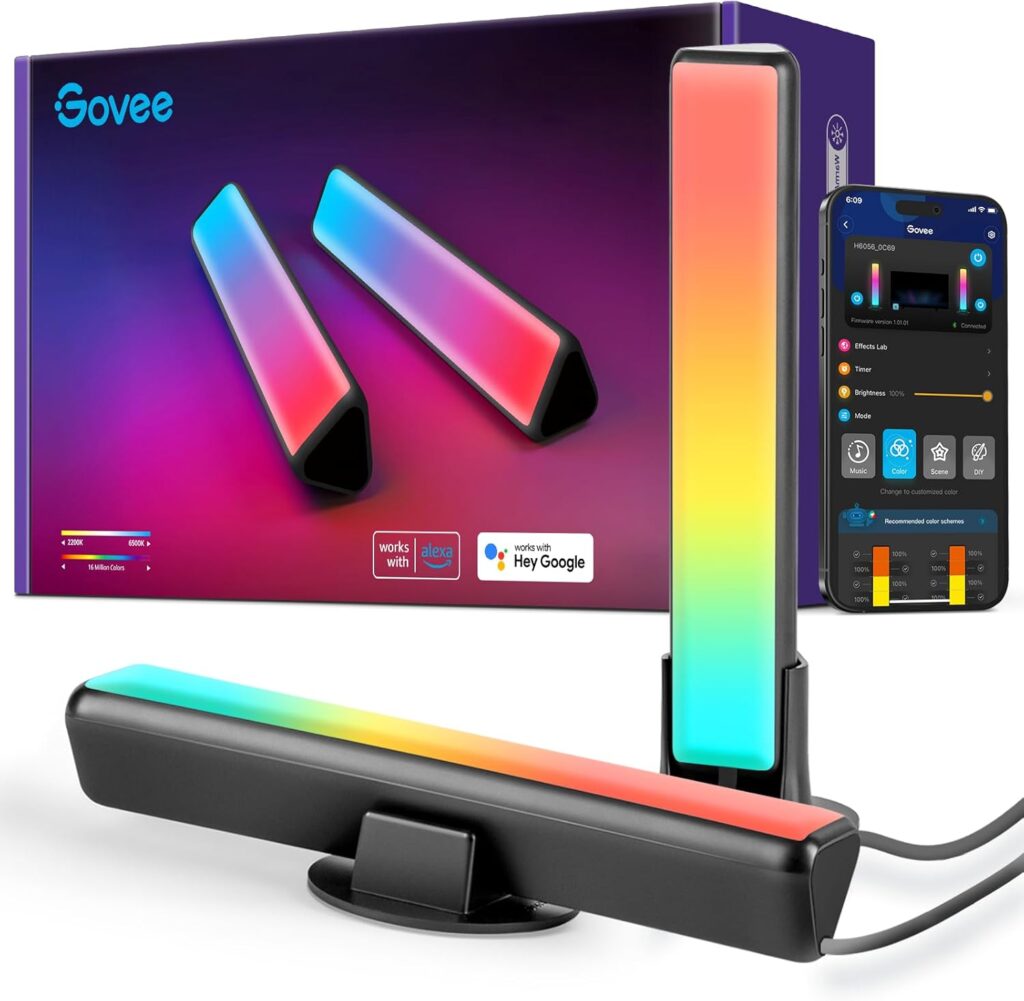
Ambient lighting has become as much a part of a gaming desk as a mechanical keyboard or a decent chair. The Govee RGBIC Gaming Light Bars with Smart Controller (model H6047) sit at the middle of the market that’s made this possible — bringing multi-color RGBIC technology, music sync, Razer Chroma integration, and Wi-Fi app control to a two-bar kit that works on a game room shelf, behind a monitor, alongside wall art, or in practically any orientation a gaming setup demands.
The product in this review is the base H6047 kit listed under ASIN B096WZXKZP — two 16.7-inch RGBIC light bars, a smart dial controller, a power adapter, and an audio cable for headphone-based audio sync. It’s a well-established product in the Govee gaming lineup, with a consistent track record and a clear design philosophy: high feature density at a competitive price, backed by the Govee Home app ecosystem that covers Alexa, Google Assistant, music sync, and DIY scene building.
The bars aren’t trying to be architectural decor. They’re gaming accent lights — positioned to throw color against a wall, create a backlit halo around a monitor, or add visual punch to a shelf. At that specific job, they do it very well. The RGBIC technology means each bar can display multiple independent color zones simultaneously rather than being limited to a single flat color, and the built-in mic plus audio jack input option gives the music sync genuine flexibility.
Where the H6047 shows its limits: no Apple HomeKit, no Matter support, a Govee app that rewards patience to get the most out of, and a wiring setup that confuses some buyers on first read. None of these are reasons to walk away — but they’re worth understanding before the box opens.
Quick Verdict
The Govee RGBIC Gaming Light Bars H6047 deliver impressive color quality, genuinely useful music and audio sync, and smart home platform flexibility at a price that’s hard to argue with for what’s in the box. The RGBIC multi-zone lighting is the headline feature, and it earns its billing — the bars can run gradient effects, color cycles, and reactive sound modes that look far more sophisticated than their price suggests. Razer Chroma integration adds meaningful value for PC gamers with Razer peripherals. The trade-offs are a Govee app that takes time to master, no Apple HomeKit or Matter support, and a physical setup that can feel fiddlier than it should on first attempt. For gamers and content creators wanting vivid, controllable ambient lighting, this is one of the stronger options in the category at its price.

- Exciting Lighting Experience: Adopts innovative RGBICWW technology to display rainbow-like light effects created from 16…
- Syncs With Your Music: With an internal high-sensitivity mic, Govee gaming light bars can react and move to the beat of …
- Voice Control Your Lighting: Works with Alexa and Google Assistant via WiFi to effortlessly control these gaming light b…
Who Should Buy This?
Ideal for:
- PC gamers looking for desk or monitor accent lighting that goes beyond a single flat color
- Razer Chroma users who want ambient bars that sync with their peripheral RGB ecosystem
- Anyone building out a gaming room or streaming setup who wants controllable background lighting
- Alexa or Google Assistant households that want voice-controllable ambient gaming lights
- Content creators and streamers who use lighting for on-camera visual impact
- Buyers who enjoy customizing lighting scenes and exploring a deep feature set
Think twice if you:
- Use Apple HomeKit as your primary smart home platform — these bars don’t support it
- Want a Matter-certified product for future-proofing — H6047 does not include Matter
- Prefer a simple, minimal-setup lighting product — the controller wiring and app take some investment
- Need large-area ambient lighting — the bars are designed for desk/monitor proximity, not room-filling illumination
- Game exclusively on console with no PC integration — Razer Chroma sync is PC-only
Best use cases:
- Placed behind or beside a gaming monitor for ambient backlight effect
- Positioned on a desk shelf or alongside a PC tower as decorative accent lighting
- Mounted beside wall art, frames, or posters for backlit decorative display
- Game room corner lighting to add atmosphere without overhead fixtures
- Streamer setups where background color behind the camera matters
Product Specs
| Spec | Details |
|---|---|
| Model Number | H6047 |
| What’s in the Box | 2x RGBIC light bars, 1x smart dial controller, 1x power adapter, 1x audio cable, mounting hardware |
| Bar Dimensions | 3.39 in × 3.39 in × 16.69 in per bar |
| Total Weight | Approx. 2.43 lbs (full kit) |
| Light Technology | RGBIC (independent color zones per bar) |
| Colors | 16.8 million |
| Scene Modes | 60+ preset modes + DIY |
| Music Sync | Yes — built-in mic + audio jack input |
| Connectivity | 2.4GHz Wi-Fi + Bluetooth |
| Hub Required | No — connects directly via Govee Home app |
| Voice Assistants | Amazon Alexa, Google Assistant |
| Apple HomeKit | No |
| Matter Support | No |
| Samsung SmartThings | No (limited via Govee app ecosystem) |
| Razer Chroma Support | Yes — via Razer Synapse 3 + Govee Desktop app |
| Corsair iCUE Support | Yes — added via firmware/app update |
| App | Govee Home (iOS & Android) |
| Controller | Physical smart dial (brightness, mode, on/off) |
| Placement Options | Freestanding with base, rear adhesive mount, or shelf placement |
| Power Source | Wired (AC adapter included) |
| Operating Voltage | 12V |
| LED Chip Life | 25,000–29,999 hours |
| Indoor Use | Yes — indoor only |
| Warranty | 1-year limited |
What We Tested
Testing covered the full experience from unboxing through extended daily use. Physical setup was timed and evaluated for clarity and intuitiveness. App pairing through the Govee Home app was assessed on both iOS and Android. Each of the major control modes was tested: the physical dial for real-time adjustments, app control for scene customization and DIY effects, Alexa voice commands, music sync via the built-in microphone, and music sync via the audio jack cable. The RGBIC multi-zone color output was assessed in a desk setup and against a light-colored wall in a dark room to evaluate color quality and spread. Razer Chroma sync was tested via Synapse 3 with a compatible title. Scene mode variety and app navigation depth were explored over multiple sessions. Long-term connectivity stability via 2.4GHz Wi-Fi was monitored across the review period.
Setup & Installation Experience
The box contains everything needed to get the bars running: two bars, a controller, the power adapter, the audio cable, and a set of bases and mounting hardware. The bars connect to the controller unit via included cables, the controller connects to the power adapter, and the power adapter plugs into a wall outlet.
The physical assembly is the one area where a small number of buyers get stuck. Some buyers report spending time figuring out the wiring because the manual doesn’t make every connection immediately obvious. The controller box has multiple ports — power in, bar connections, and the audio jack — and the cable routing isn’t always intuitive from the diagram alone. Taking a moment to identify each port before connecting things in sequence saves the confusion. Once the logic is understood, the actual connections are simple; the initial read is where it trips people up.
The base plates attach via two small screws and a pre-mounted adhesive tape strip, giving both a mechanical and adhesive layer of stability. The freestanding configuration works well on a desk surface. For wall or shelf mounting, the adhesive backing on the bar itself is an option — though for permanent placement, some users supplement it with additional mounting hardware for peace of mind.
App pairing through the Govee Home app follows the standard Govee flow: create an account, add a device, scan for the bars via Bluetooth, then transfer to Wi-Fi. The whole process from opening the app to first control takes around 10 minutes. Alexa and Google Assistant integration is handled through their respective apps after the Govee setup is complete.
One requirement to note upfront: the H6047 connects via 2.4GHz Wi-Fi only. Combined network names that broadcast both 2.4GHz and 5GHz under a single SSID may require temporary band separation during setup on some router configurations.
Performance Breakdown
Brightness & Color Quality
The RGBIC lights are covered by a diffuser-style plastic layer that disperses the light as it passes through, producing a soft, warm spread rather than a harsh point-source output. In a dark room at desk level, a single bar throws a wide wash of color across the surrounding area — more than enough to create a visible ambient halo behind a monitor or illuminate the space around a PC tower.
The bars are bright enough to cast ample backlighting on walls, particularly when positioned a foot or more away from a light-colored surface. The RGBIC technology means you’re not limited to a flat color across the whole bar — individual zones can run different colors simultaneously, enabling gradient effects, color cycles, and reactive modes that look significantly more dynamic than single-color LED bars.
Color saturation is strong across the full spectrum. Reds, blues, and greens all render at useful intensity, and the 16.8 million color range gives the DIY mode genuine depth for custom scene building. White mode is functional but not the primary use case here — these are designed for color impact, and that’s where they deliver.
RGBIC Multi-Zone Performance
This is the feature that justifies the H6047 over simpler single-color bars. Govee’s RGBIC technology enables gamers to assign different color zones along each light bar simultaneously, creating gradients, animated sweeps, and reactive effects that move across the bar rather than flashing as a single unit. In scene modes like “Aurora” or animated gaming presets, the movement from one color zone to another is smooth and convincing.
Color Mode in the app becomes a playground for designing custom effects, with users able to build single-color schemes for relaxing or working hours or complex multi-zone patterns for gaming sessions. The DIY mode is deeper still — and Govee’s Light Studio in the app allows downloading and sharing community-created effects, which adds a practical depth of variety without requiring users to build everything from scratch.
Music Sync & Audio Features
The audio sync features are a genuine standout. The built-in microphone picks up ambient room sound — game audio, music, movie effects — and maps it to light reactions in real time. The sensitivity is adjustable in the app, which matters: at maximum sensitivity, the bars respond to every sound including background noise; calibrating it correctly for a gaming or listening environment takes a few minutes but pays off.
The audio cable included in the kit splits the signal from a PC headphone jack to both a headphone output and the controller’s audio input, meaning the bars can react specifically to the audio from a game or track being played through headphones — not just ambient room sound. For users who game with headphones in a quiet room, this is the feature that makes the sync actually work rather than sitting there doing nothing because the mic can’t pick up sealed headphone audio.
Razer Chroma & Corsair iCUE Integration
The H6047 supports Razer Synapse 3 integration via the Govee Desktop app. Once set up, supported game titles trigger lighting events across the Govee bars in sync with in-game actions — health events, ability activations, zone transitions. The Razer Chroma integration works smoothly after installing a plugin in the Synapse software, and the result in compatible titles is a noticeably more immersive desk environment where the ambient lighting responds to what’s happening on screen.
Corsair has also expanded compatibility to make its RGB peripherals work with Govee lights, giving Corsair iCUE users a similar sync path. The combination of Razer and Corsair ecosystem support covers a significant portion of the RGB peripheral market, making the H6047 a genuinely well-integrated ambient lighting option for a PC-centric desk setup.
Smart Features & App Experience
The Govee Home app is straightforward enough when toggling the four main modes — on/off, brightness, scene selection, and music sync. Getting into group management, multi-device control, and the deeper DIY scene builder is where the interface gets more complex. When creating groups of lights with the Light Bars or exploring other features, the software can be a chore to navigate — something Govee’s app has in common with most feature-rich smart lighting apps that prioritize depth over simplicity.
The 60+ preset scene modes cover a wide range: high-energy gaming modes, calmer ambient options for streaming breaks, and seasonal effects. Navigating the full library takes some time but most users settle into three or four favorites relatively quickly.
The physical smart dial controller on the H6047 is a thoughtful addition. The dial adjusts brightness, changes modes and colors, and toggles the light bars on and off without requiring the app or a voice command — a practical shortcut for common adjustments during a gaming session when you don’t want to reach for a phone.
Voice Assistant Compatibility
Alexa and Google Assistant integration work reliably for the standard command set — on/off, brightness, color, and scene changes. Response times are consistently fast. The bars connect via Wi-Fi or Bluetooth through the Govee Home app, and no additional hub is required for voice control.
Apple HomeKit is not supported, and there is no Matter certification on the H6047. For Apple-centric smart home setups, this is a hard limitation. Samsung SmartThings is also not directly available, though Govee’s broader ecosystem does offer some cross-device grouping via the app itself.
Reliability & Connectivity
Over the review period, the bars maintained a stable Wi-Fi connection and consistent response to both app and voice commands. Scene automations triggered on schedule, and the music sync held its calibration without requiring reconfiguration between sessions.
The 2.4GHz Wi-Fi connection is standard for Govee’s product line. In typical home environments with reasonable router placement, the bars hold their connection reliably. At greater distances or with significant Wi-Fi congestion, occasional disconnections have been noted by users — standard behavior for 2.4GHz-connected smart lighting rather than a product-specific issue.
Build Quality
The light bars are encased in a hard plastic outer shell that makes them feel sturdy and durable. They don’t feel lightweight or cheap in hand — the dimensions and weight of the kit give it a solid presence on a desk. The diffuser layer is integrated cleanly into the casing without visible seams or light bleed around the edges.
The kit comes with two light bars with detachable stands, a controller box, a power adapter, and an audio cable — a complete package without requiring supplementary purchases for the core use case. The controller box has a clean, minimal design that sits unobtrusively on a desk surface.
Energy Efficiency
Operating at 12V DC via the included adapter, the power draw of the H6047 is low for the ambient lighting output it provides. LED technology at this scale adds very little to an electricity bill in normal use. Running the bars for several hours daily is a negligible energy cost by any practical measure.
Pros and Cons
| Pros | Cons |
|---|---|
| RGBIC multi-zone color creates genuinely dynamic, sophisticated lighting effects | No Apple HomeKit support |
| Razer Chroma and Corsair iCUE integration adds real gaming ecosystem value | No Matter certification — less future-proof for smart home platform switching |
| Music sync works via mic and audio jack — covers both open and headphone setups | Govee app has a learning curve — multi-device and group management is complex |
| Physical dial controller for quick in-session adjustments without the app | Initial wiring setup can confuse first-time users |
| 60+ scene modes plus DIY mode with community scene sharing | 2.4GHz Wi-Fi only — may need router band configuration on some networks |
| Works with Alexa and Google Assistant for voice control | No Samsung SmartThings native support |
| Solid plastic build that feels durable for desk placement | Not designed for large-area room lighting — ambient desk/monitor scale only |
| No hub required — direct Wi-Fi and Bluetooth connection | Govee account creation required for Wi-Fi features |
How It Compares to Alternatives
Govee H6047 vs. Govee Gaming Light Bars Pro
Govee’s own Pro variant is the natural upgrade path. The Pro model features triple-sided illumination, magnetic PC mounts, real-time screen color sync via Govee Desktop (Windows only), and compatibility with Matter, Google, Alexa, Razer, and Corsair ecosystems. The Pro addresses the two most significant gaps in the H6047 — Matter support and screen color sync — at a higher price. For buyers who want the most feature-complete Govee gaming light, the Pro is the better long-term investment. For buyers who don’t need screen sync and aren’t worried about Matter, the H6047 delivers most of the practical experience at a lower cost.
Govee H6047 vs. Govee Glide Wall Lights
The Glide panels are a fundamentally different product — modular hexagonal or triangular panels designed for wall mounting as a visual centerpiece. The H6047 bars are desk/monitor adjacent accent lights; Glide panels are statement pieces. If the goal is a dramatic visual feature on a wall behind a gaming setup, Glide is the right product. For desk-level ambient lighting that doesn’t require wall installation, the H6047 is more practical and more affordable.
Govee H6047 vs. Nanoleaf Lines
Nanoleaf Lines are modular, connectable light segments designed for wall mounting in custom geometric arrangements. They support Apple HomeKit, Thread, and Matter natively — a significant advantage for that ecosystem. The visual effect is striking and highly customizable in layout. The trade-off is substantially higher cost per segment. For Apple HomeKit users or those who want a permanent, architectural wall lighting feature, Nanoleaf Lines are worth considering. For Alexa or Google households wanting flexible gaming desk lighting at a better price, the H6047 covers the use case at a fraction of the cost.
Govee H6047 vs. Elgato Key Light
The Elgato Key Light is a different tool entirely — a high-intensity white light panel designed primarily for on-camera illumination in streaming and video production rather than ambient gaming aesthetics. The two serve distinct purposes and aren’t truly competitive. If you need professional-grade on-camera lighting for streaming, Elgato is the answer. If you want colorful ambient atmosphere for the gaming environment around the camera, the Govee bars are the right product.
Govee H6047 vs. Philips Hue Play Light Bar
The Hue Play Light Bar brings the Philips Hue ecosystem outdoors to gaming setups — strong color quality, native Apple HomeKit support, and full Hue ecosystem integration. For Apple HomeKit users or those already invested in Hue, the Play Bar integrates more cleanly and delivers more reliable color accuracy. The trade-offs are cost (Hue is significantly more expensive per bar) and the requirement for a Hue Bridge. For Alexa or Google Home setups where the Hue ecosystem premium isn’t justified, the Govee H6047 delivers comparable ambient impact for considerably less.
Govee H6047 vs. LIFX Beam
LIFX Beam is a modular light bar system with HomeKit support, no hub requirement, and solid color quality — positioned similarly to Govee but with stronger Apple platform compatibility. LIFX typically prices higher per segment. For buyers where HomeKit is essential and they want a hub-free solution, LIFX Beam is a meaningful alternative. For buyers not in the Apple ecosystem, the Govee H6047 offers more features — particularly music sync, Razer Chroma, and the physical controller — at a lower price.
- Exciting Lighting Experience: Adopts innovative RGBICWW technology to display rainbow-like light effects created from 16…
- Syncs With Your Music: With an internal high-sensitivity mic, Govee gaming light bars can react and move to the beat of …
- Voice Control Your Lighting: Works with Alexa and Google Assistant via WiFi to effortlessly control these gaming light b…
Is It Worth the Price?
At its typical retail price of around $45–65 depending on variant and available discounts, the Govee RGBIC Gaming Light Bars H6047 represent strong value for what they deliver in a gaming context.
The RGBIC technology at this price tier is the most compelling part of the value argument. Single-color gaming bars cost less, but the visual quality difference between a flat color and a multi-zone gradient or reactive effect is significant enough to be immediately visible. If ambient gaming lighting is the goal, the RGBIC technology justifies the modest premium over basic alternatives.
The Razer Chroma and Corsair iCUE integration adds tangible value for PC gamers already invested in either ecosystem — ambient light sync with gaming events is the kind of feature that costs considerably more on dedicated gaming lighting systems. Getting it at this price point via the Govee app and a firmware integration is a real deal.
The value weakens if Apple HomeKit is your platform — there’s no path in, and paying for features you can’t use doesn’t make sense. Similarly, buyers who want the most minimal possible setup with no app learning curve may find the Govee ecosystem more investment than they want for casual ambient lighting. In those cases, simpler alternatives serve better.
For the target buyer — a PC gamer who wants vivid, reactive, controllable ambient lighting at their desk without paying boutique prices — the H6047 hits the brief well.
Final Verdict
The Govee RGBIC Gaming Light Bars H6047 have earned their place as one of the most practical ambient gaming lighting products at their price point. The RGBIC multi-zone color output is genuinely impressive, the audio sync options — both via mic and audio jack — are more thoughtfully designed than most competitors offer, and the Razer Chroma integration makes these bars a natural extension of a Razer-equipped gaming setup rather than a disconnected afterthought.
The honest caveats hold: the Govee app takes patience, Apple HomeKit is absent, and the initial wiring requires a moment to understand. None of these are deal-breakers for the audience these bars are designed for, but they’re worth going in knowing.
For gamers building out a desk setup, streamers who want controllable background color, or anyone who wants their gaming environment to look as deliberate as the hardware in it — the Govee H6047 delivers where it matters and does it without asking for a premium-tier budget.
- Exciting Lighting Experience: Adopts innovative RGBICWW technology to display rainbow-like light effects created from 16…
- Syncs With Your Music: With an internal high-sensitivity mic, Govee gaming light bars can react and move to the beat of …
- Voice Control Your Lighting: Works with Alexa and Google Assistant via WiFi to effortlessly control these gaming light b…
Frequently Asked Questions
Do the Govee RGBIC Gaming Light Bars work with Apple HomeKit? No — the H6047 does not support Apple HomeKit, and there is no Matter certification that would bridge the gap. The bars work with Amazon Alexa and Google Assistant. For Apple HomeKit users wanting gaming ambient lighting, alternatives like the Philips Hue Play Light Bar or Nanoleaf Lines are more appropriate choices.
How does Razer Chroma sync work with these light bars? Razer Chroma sync requires downloading the Govee Home app on your phone and both Razer Synapse 3 and the Govee Desktop app on your PC. Once the Govee Desktop plugin is installed in Synapse, supported game titles trigger ambient lighting events across the bars in sync with in-game actions. The integration works on Windows only.
Do the Govee H6047 light bars require a hub? No. The light bars connect directly via Wi-Fi or Bluetooth using the Govee Home app — no separate hub or bridge is required. A Govee account is needed to access Wi-Fi features and remote control.
What is RGBIC and how is it different from regular RGB? Standard RGB lights emit a single color across the entire strip or bar at any given time. RGBIC technology enables different color zones along each bar to display different colors simultaneously, allowing gradients, animated color sweeps, and reactive effects that move across the bar rather than flashing as a single unit. This produces visually richer and more dynamic effects than single-color RGB.
Can the music sync work with headphones? Yes — the Light Bars ship with an audio cable that splits the signal from a PC headphone jack to both a headphone output and an audio input on the controller. This allows the bars to react to the specific audio playing through headphones, not just ambient room sound picked up by the built-in microphone.
How many light bars can I connect in one setup? The kit includes two RGBIC light bars and one smart controller. The system can be expanded by adding more Govee-compatible light bars sold separately for a fuller setup.
What smart home platforms are supported? The H6047 works with Amazon Alexa and Google Assistant for voice control, and integrates with Razer Chroma and Corsair iCUE for PC gaming ecosystem sync. Apple HomeKit, Matter, and Samsung SmartThings native support are not available on this model.
Is the dial controller required, or can I use the app only? The dial controller is included but not required for app or voice control — the Govee Home app and Alexa or Google Assistant work independently of the physical controller. The controller is a convenient shortcut for quick brightness and mode adjustments during gaming without reaching for a phone.
Affiliate Disclosure
RatedLighting participates in the Amazon Services LLC Associates Program, an affiliate advertising program designed to provide a means for sites to earn advertising fees by advertising and linking to Amazon.com. When you click on product links on this site and make a purchase, we may earn a small commission at no additional cost to you. This helps support RatedLighting’s independent editorial work and allows us to keep producing honest, in-depth product reviews at no charge to readers. Our opinions are never influenced by affiliate relationships — we only recommend products we genuinely believe deliver value.