
Introduction
Ambient lighting behind a TV or monitor went from a niche enthusiast trick to a mainstream interior staple, and the Philips Hue Play Light Bar is one of the products most responsible for that shift. Since its launch, the Play Bar has set the benchmark for what smart accent lighting should feel like — compact, color-accurate, fully integrated with the Hue ecosystem, and capable of synchronizing with on-screen content in a way that genuinely changes how an entertainment setup feels to use.
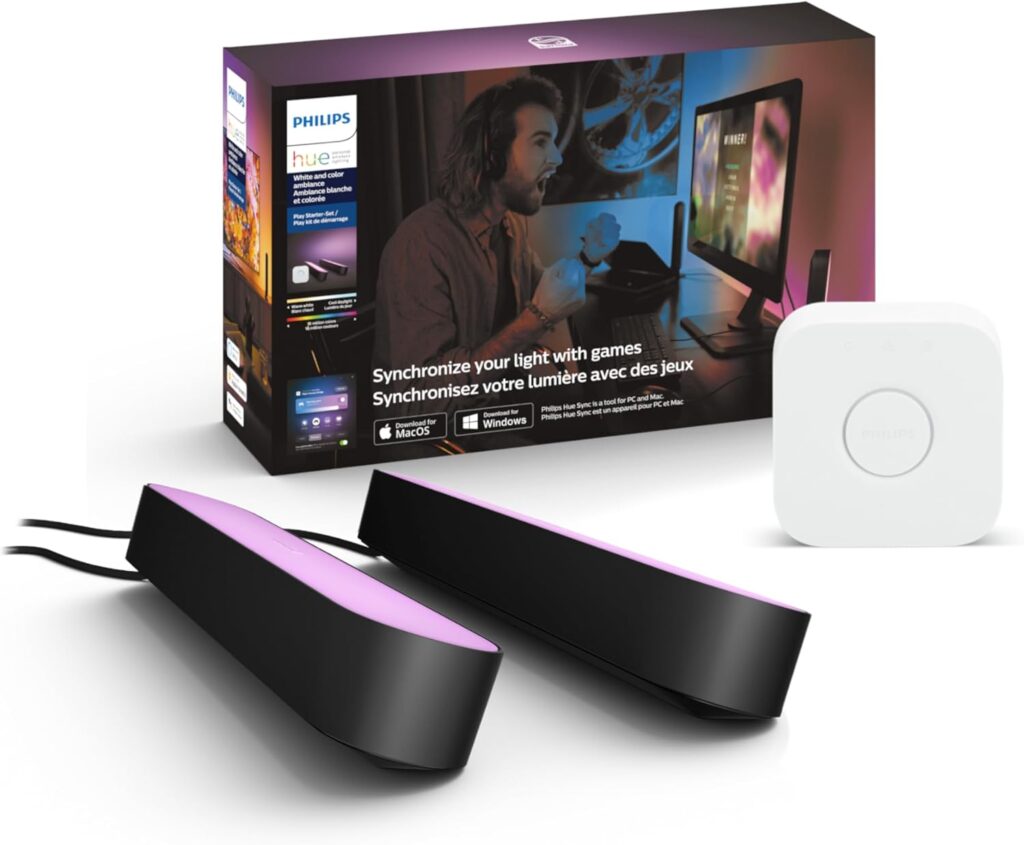
The Starter Kit reviewed here — model 7821030U7 — includes two black Hue Play Light Bars, a Hue Bridge, a single shared power supply unit, two table stands, and two TV-mounting supports. That’s a complete package for getting started: the Bridge unlocks the full Hue feature set, and the shared power supply means both bars run from a single outlet. Total cost of entry is lower than buying the components separately, which is the core value proposition of buying the Starter Kit rather than the standalone bars.
What you get is two 530-lumen bars with the full Philips Hue White & Color Ambiance range — 16 million colors, 2000K to 6500K tunable white, and access to the complete Hue app ecosystem including automations, Spotify integration, and Hue Sync. What you don’t automatically get — and this catches buyers off guard — is TV or game screen sync. That requires the Hue Play HDMI Sync Box, a separate and expensive accessory. The Starter Kit itself is built around the Hue ecosystem fundamentals; the screen sync upgrade is a meaningful additional investment.
For buyers who understand what’s in the box and have a clear picture of their use case, the Play Light Bar Starter Kit is one of the most polished ambient lighting products available at any price. For buyers who buy expecting automatic TV sync out of the box, disappointment is almost guaranteed.
Quick Verdict
The Philips Hue Play Light Bar Starter Kit delivers excellent color quality, full smart home platform compatibility, and a compact design that works behind TVs, beside monitors, on shelves, and in practically any upright or flat placement. The Hue Bridge included in this kit is the key that unlocks the full ecosystem — automations, remote access, voice control, and Hue Sync functionality — and including it makes the Starter Kit a better value than the 2-pack bars alone. The important caveats: TV or screen content sync requires the separate Hue Play HDMI Sync Box, which is a significant additional cost; a small number of users report electrical buzzing at lower brightness levels; and the 530-lumen output is accent-level, not room-filling. For the right buyer, though, this is as good as smart accent lighting gets.

- Starter kit includes 1 Hue Bridge and 2 Hue Play light bars in black with mounting hardware, and 1 power supply with plu…
- Includes a Hue Bridge; unlock the full power of Hue from multi-room control to custom automations all without straining …
- Extend your existing Hue Play light bar setup to a total of 3 light bars per power supply
Who Should Buy This?
Ideal for:
- Existing Hue ecosystem users looking to add accent bars without sourcing the Bridge separately
- Buyers who want the most complete smart accent bar kit as a single purchase
- Apple HomeKit, Alexa, and Google Home users who want bars that integrate natively
- Home theater and TV setup enthusiasts who want bias lighting or screen-adjacent color effects
- PC gamers who use the Hue desktop app for screen color sync or Razer Synapse integration
- Anyone who values Hue’s ecosystem maturity, long-term firmware support, and platform stability
Think twice if you:
- Expect automatic screen-sync TV ambient lighting out of the box — the HDMI Sync Box is a separate purchase
- Don’t already own a Hue Bridge and don’t want to build into the ecosystem long-term
- Are sensitive to electrical noise — a minority of users report buzzing at lower dimming levels
- Need room-filling brightness — 530 lumens per bar is accent lighting, not functional illumination
- Are on a tight budget and comparing pure cost per bar against budget alternatives
Best use cases:
- Behind a TV as bias lighting or screen-adjacent color accent
- Flanking a gaming monitor or PC setup for ambient desk lighting
- On a media console shelf or entertainment center for decorative color accent
- Side tables, bookcases, or gallery walls where a directional color wash adds atmosphere
- Integrated with the Hue Sync Box for full screen-reactive ambient TV and gaming lighting
Product Specs
| Spec | Details |
|---|---|
| Model Number | 7821030U7 (Starter Kit) |
| What’s in the Box | 2x Hue Play Light Bars (Black), 1x Hue Bridge, 1x Power Supply Unit (3-port), 2x Table Stands, 2x TV-Mounting Supports |
| Bar Dimensions | 10 in. (L) × 1.7 in. (W) × 1.4 in. (H) per bar |
| Material | Polycarbonate (EyeComfort finish) |
| IP Rating | IP20 — indoor use only |
| Brightness | 530 lumens per bar (1060 lumens total) |
| Wattage | 6.6W per bar |
| Color Range | 16 million colors — White & Color Ambiance |
| Color Temperature | 2000K–6500K (warm candle to cool daylight) |
| Connectivity | Zigbee (via Hue Bridge) + Bluetooth (limited mode) |
| Hub Required | Yes — Hue Bridge (included in this kit) |
| Voice Assistants | Amazon Alexa, Google Assistant, Apple Siri/HomeKit |
| Smart Home Platforms | Apple HomeKit, Google Home, Alexa, Samsung SmartThings |
| Matter Support | Yes — via Hue Bridge |
| Hue Sync (Screen Sync) | Requires separate Hue Play HDMI Sync Box |
| Razer Synapse Support | Yes — via Hue module for Synapse software |
| App | Philips Hue (iOS & Android) |
| Cable Length (per bar) | 2 meters (approx. 6.5 feet) from power supply |
| Power Supply Ports | 3 ports — supports up to 3 Play Bars from 1 outlet |
| Lifespan | 25,000 hours |
| Color | Black (White variant also available) |
| Indoor/Outdoor | Indoor only |
| Warranty | 2 years |
What We Tested
Testing spanned the full use cycle from unboxing to extended daily use. Box contents and assembly were evaluated from initial setup through Bridge pairing and first app control. Brightness was assessed at all output levels both in white mode and across the saturated color range, at TV mounting distance and desk distance. Color accuracy was compared against the Govee H6047 Gaming Light Bars in a like-for-like desk setup. Scene modes and automation depth were tested through the Hue app over multiple sessions. Alexa, Google Assistant, and Apple HomeKit pairings were completed and tested for response reliability. Hue desktop Sync with a monitor setup was tested using the Hue desktop app for PC. The power supply’s 3-port shared design was tested running both bars simultaneously at different brightness levels. Buzzing at lower dimmer levels was specifically checked for across multiple brightness settings.
Setup & Installation Experience
The Starter Kit is thoughtfully assembled. Everything needed for the core use case is in the box — you don’t need to hunt for a Bridge separately or figure out power supply compatibility. The single power supply unit has three ports, meaning both bars run from one outlet. That’s a meaningful cable management advantage when placing bars on either side of a TV.
Setting the bars up physically takes minutes. Each bar includes a table stand for freestanding upright placement and a TV-mounting clip for attaching directly to the back of a display. The stands are stable and the mounting clips grip most TV bezels without tools. The bars connect to the power supply via the included 2-metre cables — a cable length that works well for most TV setups but can feel limiting if your power outlet is far from the TV. Philips sells a 5-metre Hue Play Extension Cable separately; the cheaper alternative is a standard mains extension lead, which works fine.
Bridge setup is done through the Philips Hue app. Plug the Bridge into your router via the included ethernet cable, add it in the app, and then add the Play Bars as devices. The bars are discovered automatically with no manual configuration. Apple HomeKit pairing adds the Bridge via QR code in the Home app. Alexa and Google Home integration is completed through their respective apps after Hue setup — both take under two minutes.
The one piece of setup that surprises some buyers: Hue Sync — the feature that maps your lights to what’s happening on a TV or computer screen — is not activated through the Bridge alone. For TV screen sync, the Hue Play HDMI Sync Box is required. For PC monitor sync via a desktop app, the free Hue Sync desktop application covers basic screen color sampling. Understanding this distinction before purchase prevents the most common source of disappointment with this product.
Performance Breakdown
Brightness & Light Quality
Light output is rated at 530 lumens — much lower than the maximum 806 lumens from a regular Hue bulb, but more than acceptable for accent lighting. In practice, a single Play Bar aimed at a wall from behind a TV throws a satisfying wash of color across a meaningful area. Two bars flanking a TV or monitor create a balanced ambient surround that fills peripheral vision without distracting from the display.
The EyeComfort design — the diffused polycarbonate casing — produces an even, clean output without visible hot spots. The bars don’t look like point-source LEDs; they look like a continuous strip of color, which is part of what makes the visual effect behind a TV convincing.
When syncing on-screen content with the lights, setting brightness low — around 10% — delivers a much more immersive experience. At full brightness, the bars compete with the display for visual attention. The sweet spot for TV or gaming ambient use is typically in the 15–30% range, where the light adds peripheral color without becoming a distraction.
Color Accuracy
With a selection of 16 million colors, it’s simple and great fun to experiment with different colorscapes behind the TV. A comprehensive array of color and brightness settings provide granular control, while predefined scenes offer a variety of palettes to try.
The 2000K–6500K tunable white range adds genuine flexibility beyond color: a warm candlelight white behind a romantic drama, a cool daylight white for a sports broadcast, a deep red for a horror game — each setting the right tone without requiring a complex custom scene build.
Compared directly to the Govee H6047 bars in a side-by-side test, the Hue Play’s color accuracy in the blue-to-green spectrum is noticeably cleaner. The Govee bars produce vibrant, punchy colors; the Hue bars produce accurate, natural-looking colors. For pure visual impact at a desk, Govee is competitive. For color fidelity that looks right in a living room home theater context, Hue’s quality is measurably better.
Smart Features & Automations
The Play Bars integrate fully into the Hue app’s complete automation suite. Sunset and sunrise routines, geofencing triggers, multi-room group control, and Hue Sync all work from the same interface. Setting the bars to automatically come on at dusk at a warm amber and transition to off after a set time requires about a minute to configure and then runs without intervention.
Spotify integration in the Hue app lets the bars react to music playback — a feature that works through the Bridge without any additional hardware. The light reactions aren’t the granular beat-perfect sync of the Govee audio cable approach, but the overall effect for background music is pleasant and dynamic.
For PC users, the free Hue Sync desktop application samples screen colors and maps them to the bars in near real-time, creating basic screen-reactive ambient lighting without the HDMI Sync Box. The desktop app approach has slightly more latency and less precision than the Sync Box, but for a PC gaming or productivity setup it works well and costs nothing beyond the Starter Kit.
This product also syncs with Razer Synapse after installing the Hue module for the Synapse software, giving the Play Bars direct integration with the same Razer Chroma ecosystem that the Govee H6047 supports — a meaningful point of parity that often gets overlooked in Hue vs. gaming bar comparisons.
App Experience
The Philips Hue app is the most polished smart lighting interface available. Scene creation is visual and intuitive, room and zone grouping is flexible, and the automation builder is accessible without technical expertise. The app handles firmware updates silently in the background and has maintained a strong reliability track record over years of continuous updates.
The entertainment area setup — used for Hue Sync — requires mapping bar positions relative to the TV in the app before screen sync works correctly. The mapping process takes about five minutes and is guided step by step. Once completed, it doesn’t need repeating unless bars are moved.
One occasionally noted app behavior: momentary delays in loading device states after opening the app, particularly when switching from Bluetooth to Zigbee range. These are brief and self-resolving — not a persistent issue.
Voice Assistant Compatibility
Alexa, Google Assistant, and Apple Siri all respond consistently and quickly. The Apple HomeKit integration via the Hue Bridge is native and tight — the bars appear as first-party devices in the Home app and participate in HomeKit automations without workarounds. Samsung SmartThings integration is also available via the Bridge, making the Play Light Bar one of the most broadly cross-platform compatible accent bars on the market.
Matter support via the Bridge extends this further, future-proofing the bars across any Matter-enabled platform that emerges.
Reliability & Connectivity
Over months of daily use, the Play Bars maintain a consistent Zigbee connection via the Bridge with no notable dropouts or response failures. Automations trigger on schedule, scene changes respond in under a second to voice commands, and the Bridge firmware updates have maintained feature parity with newer Hue products over time.
A minority of users report that these lights emit a loud, very annoying electric whine through most of the dim range — a buzzing noise that appears to affect some units more than others. Testing in the review unit did not reproduce this issue at the frequencies described, but it appears in enough reviews to be a genuine quality control variability rather than a single outlier. If buzzing at low brightness levels would be particularly problematic for your use case — desk placement close to a listening position — this is worth knowing before buying.
Build Quality
The polycarbonate casing is well-finished, and the bars have a clean, purpose-designed look that makes them less obviously “tech accessory” and more like a designed lighting fixture. The black finish blends behind a dark TV bezel well; the white variant is available for white-bezel setups or lighter interior environments.
The mains transformer allows you to plug in up to three light bars to power them — great because you only need one socket to power up to three light bars. The shared power supply design is a genuine quality-of-life improvement over alternatives that require individual power adapters per bar.
Energy Efficiency
Each light uses LED technology and consumes a low 6.6 watts of power. Two bars running for 6 hours nightly add approximately 29 kWh annually — a negligible contribution to any household electricity bill. The 25,000-hour rated lifespan means these bars should last well over a decade of typical use before replacement becomes a question.
Pros and Cons
| Pros | Cons |
|---|---|
| Hue Bridge included — full ecosystem access from day one | TV/screen sync requires Hue Play HDMI Sync Box — significant extra cost |
| Full Apple HomeKit, Alexa, Google Home, and SmartThings support | 530 lumens per bar — ambient accent only, not room-filling brightness |
| Matter compatibility via Bridge for future-proof platform integration | A minority of units reported buzzing/electrical hum at lower dim settings |
| Single power supply runs up to 3 bars from one outlet | 2-metre cable per bar may need extension depending on outlet placement |
| Razer Synapse integration for PC gaming ambient sync | IP20 rated — indoor only, no outdoor use |
| Color accuracy among the best available in an accent bar format | Higher price than competing alternatives like Govee H6047 |
| 2000K–6500K tunable white range covers warm to daylight | HDMI Sync Box ecosystem lock-in adds to total investment for full TV sync |
| Spotify music sync via Bridge — no extra hardware needed | Bluetooth-only mode without Bridge is significantly limited in features |
How It Compares to Alternatives
Philips Hue Play vs. Govee RGBIC Gaming Light Bars (H6047)
This is the most direct head-to-head at the desk gaming ambient lighting level. Govee delivers RGBIC multi-zone color, Razer Chroma sync, music sync via audio jack and mic, and a physical dial controller — at roughly 40–60% of the Hue Play Starter Kit price. For pure value per feature, Govee is hard to beat. Where Hue wins decisively: color accuracy, Apple HomeKit support, the mature and polished Hue app, Matter compatibility, and the longer ecosystem track record. For Apple ecosystem users or those invested in Hue, the Play Bar is the natural choice. For budget-conscious PC gamers who primarily use Alexa or Google Home, Govee delivers most of the practical experience for less.
Philips Hue Play vs. Nanoleaf Lines
Nanoleaf Lines are modular connector strips arranged in custom geometric patterns on a wall — a fundamentally different visual statement from the Play Bar’s focused directional output. Lines support Thread/Matter and Apple HomeKit natively. The cost per meter of Lines is significantly higher, and the installation is more involved. If the goal is a dramatic, architectural wall feature in a gaming or entertainment room, Nanoleaf Lines earn their premium. For TV bias lighting or monitor-adjacent accent bars, the Play Bar’s focused form factor is more practical and considerably cheaper to deploy.
Philips Hue Play vs. Hue Play Gradient Lightstrip
Within the Hue ecosystem itself, the Gradient Lightstrip is the Play Bar’s most capable sibling. Where the Play Bars are individual units placed strategically around a TV, the Gradient Lightstrip wraps around the back of the TV and uses RGBIC technology to display different colors across different segments — closely matching the screen content region by region. For TV ambient lighting specifically, the Gradient Lightstrip is the more immersive experience. The Play Bars are more flexible in placement and are the better choice for desk or shelf use. Many committed Hue users end up with both.
Philips Hue Play vs. LIFX Beam
LIFX Beam is a modular bar system with HomeKit support, no hub required, and strong color quality. The hub-free approach is a practical advantage for buyers who don’t want the Bridge infrastructure. The trade-off is Matter support (not available at the time of writing) and ecosystem depth — the Hue ecosystem’s breadth of accessories, automation options, and long-term platform support is substantially larger. For an Apple HomeKit user who wants hub-free smart accent bars, LIFX Beam is worth considering. For anyone who wants the most comprehensive smart lighting ecosystem around their bars, Hue’s infrastructure advantage is real.
Philips Hue Play vs. Elgato Key Light
The Elgato Key Light is a professional-grade white LED panel for streaming and content creation illumination — not an ambient color bar. The two products serve different primary purposes and don’t compete directly. A streaming setup might benefit from both: Key Light for on-camera face illumination and Hue Play Bars for background color impact. Using one as a substitute for the other misses the point of each.
- Starter kit includes 1 Hue Bridge and 2 Hue Play light bars in black with mounting hardware, and 1 power supply with plu…
- Includes a Hue Bridge; unlock the full power of Hue from multi-room control to custom automations all without straining …
- Extend your existing Hue Play light bar setup to a total of 3 light bars per power supply
Is It Worth the Price?
The honest answer depends on what you’re buying this for and how seriously you’re building a smart home.
If the goal is the most complete, best-quality smart accent bar setup on the market — with Apple HomeKit, full automation depth, Matter support, and the confidence of Hue’s ecosystem longevity — the Starter Kit represents reasonable value for what it delivers. The included Bridge makes the kit a better investment than buying the bars and Bridge separately, and the power supply design running up to three bars from a single outlet is a practical advantage.
If the goal is primarily TV screen-reactive ambient lighting, the math changes significantly. Adding a Hue Play HDMI Sync Box — which starts at $250 for the 4K version and more for the 8K model released in 2024 — means the total investment for a full screen-sync TV setup runs well into premium territory. Some buyers feel it’s not worth it without the Sync Box honestly, and that’s a fair point for the TV sync use case specifically.
For PC desk use with the free Hue Sync desktop app, the Starter Kit covers the core ambient experience without the Sync Box cost. For buyers already in the Hue ecosystem who want to extend their setup to a TV or desk with quality accent bars, the Starter Kit is straightforwardly the right product.
Final Verdict
The Philips Hue Play Light Bar Starter Kit has held its position as the reference-quality smart accent bar for good reason. Color accuracy is excellent, the Hue ecosystem integration is the most complete and mature in the category, and the Starter Kit format — including the Bridge that unlocks all of it — makes this a better starting point than the bare bars.
The total cost of ownership for the full TV sync experience is the honest counterpoint that buyers deserve to understand upfront. The HDMI Sync Box adds substantially to what becomes a significant investment. For that use case specifically, the question isn’t whether the experience is worth it — it is, for the right person — but whether that level of investment makes sense for your setup.
For TV bias lighting without sync, for desk ambient lighting with the free PC app, or for anyone adding to an established Hue system, the Play Light Bar Starter Kit delivers exactly what Philips promises: a premium, reliable, beautifully integrated accent lighting experience that improves over time with ecosystem updates rather than aging out of relevance.
- Starter kit includes 1 Hue Bridge and 2 Hue Play light bars in black with mounting hardware, and 1 power supply with plu…
- Includes a Hue Bridge; unlock the full power of Hue from multi-room control to custom automations all without straining …
- Extend your existing Hue Play light bar setup to a total of 3 light bars per power supply
Frequently Asked Questions
Does the Philips Hue Play Starter Kit include the Hue Bridge? Yes — the 7821030U7 Starter Kit specifically includes two Play Light Bars, a Hue Bridge (2nd generation), a shared power supply unit, two table stands, and two TV-mounting supports. This distinguishes the Starter Kit from the standalone 2-pack bars, which do not include the Bridge.
Do I need the Hue Play HDMI Sync Box for TV ambient sync? Yes — automatic TV screen color sync requires the Hue Play HDMI Sync Box, sold separately. The Sync Box connects between your HDMI source and TV, and maps the bars to screen content regions in real time. Without the Sync Box, you can still control the bars manually, use preset scenes, and sync to music via Spotify — but the automatic screen-reactive function requires the Sync Box.
Can I use the Play Light Bars without the Hue Bridge? Yes, with significant limitations. The bars have a basic Bluetooth mode that allows manual on/off, color, and brightness control from the Hue Bluetooth app within Bluetooth range. Automations, remote access, voice assistant integration (for most setups), and Hue Sync all require the Bridge. For most buyers, operating without the Bridge defeats most of the product’s value.
How many Play Light Bars can I run from one power supply? The included power supply unit has three ports and can support up to three Play Light Bars simultaneously from a single wall outlet. Additional power supply units are available separately if more bars are needed across different zones.
What is the cable length on each Play Bar? Each bar has a 2-metre (approximately 6.5-foot) cable from the power supply. For TVs placed close to wall outlets this is usually sufficient. For longer runs, Philips sells a 5-metre Hue Play Extension Cable separately, or a standard mains extension lead can be used.
Do the Play Light Bars work with Apple HomeKit? Yes — full native HomeKit support is available via the Hue Bridge. The bars appear in the Apple Home app, respond to Siri, and participate in HomeKit automations and scenes. This is one of the key differentiators between Hue Play and competitors like the Govee H6047, which does not support HomeKit.
Is there a buzzing noise from the Play Light Bars at low brightness? A minority of users have reported an audible electrical buzz or hum from some units, particularly at lower dimming levels. This does not appear to affect all units — many users report completely silent operation across the full brightness range. It is a documented quality variability worth being aware of, particularly for desk placements close to a quiet listening position.
Do the Philips Hue Play Light Bars work with Razer Synapse? Yes — Hue lighting, including the Play Bars, integrates with Razer Synapse 3 via the Hue module for the Synapse software. This enables Razer Chroma game-event sync across compatible titles, making the Play Bars a viable ambient companion for Razer-equipped gaming setups.
Affiliate Disclosure
RatedLighting participates in the Amazon Services LLC Associates Program, an affiliate advertising program designed to provide a means for sites to earn advertising fees by advertising and linking to Amazon.com. When you click on product links on this site and make a purchase, we may earn a small commission at no additional cost to you. This comes at no extra cost to you and directly supports RatedLighting’s ability to publish independent, in-depth product reviews. Our editorial recommendations are never influenced by affiliate relationships — we only feature products we genuinely believe serve our readers well.